Self-hosting is a very interesting proposition to many who may be concerned about privacy, particularly when it comes to emails. However, guides often show self-hosting on a VPS, not your own hardware. As we shall see, there are very good reasons for this.
Table of contents
Open Table of contents
Act 1: The ISP
Our first issue is the ISP really does not like you hosting anything at home unless you have a business plan (which usually costs more). There are multiple things going on at the ISP end that stop you from just directly hosting.
Dynamic IPs
The biggest problem is that many are assigned dynamic IP addresses, meaning that you can’t just put your IP in a DNS record and be done with it. You would have to update it every time your IP address changes, which is not only a huge pain, but will also ensure that whatever you are hosting will have massive downtime, as DNS records get cached. So even if you change your DNS records to point to your new IP, clients will still go to the old IP for a while.
Terms of Service
Many ISPs specifically disallow hosting from home in their terms of service. For example, Rogers, one of the largest ISPs in Canada, says in their Terms of Service
You may not use [your internet] to: … operate a server … including, without limitation, mail, news, file, gopher, telnet, chat, Web, or host configuration servers, multimedia streamers or multi-user interactive forums.
Now usually one might say that this isn’t enforced by the ISP, much like piracy clauses. However:
- It is very easy to see for the ISP. For example anything sending/receiving on port 25 is near-certainly a mail server.
- Money. They are losing out if you host a server without a business plan, so they will do everything they can to make sure you aren’t getting business plan features for free.
For email servers specifically, some ISPs even put their IPs on a blacklist to ensure that any email sent from their IP addresses will not get delivered at all. So it seems like we need a VPS after all…
Act 2: VPS my Beloved
Wait a minute, doesn’t this go directly against what I said in the title about everything being on your own hardware? Well yes, but we have to compromise here. The issues with ISPs make it unwise to host directly from home (unless you have a business account of course). However, we’ll only use the VPS as a reverse proxy, whereas the actual mail server resides at home.
The Real Use of a VPN
We will use the VPS as a reverse proxy, which will hand traffic to our server at home. But wait, how do we connect the two? We’re back on square one here no?
Nope.
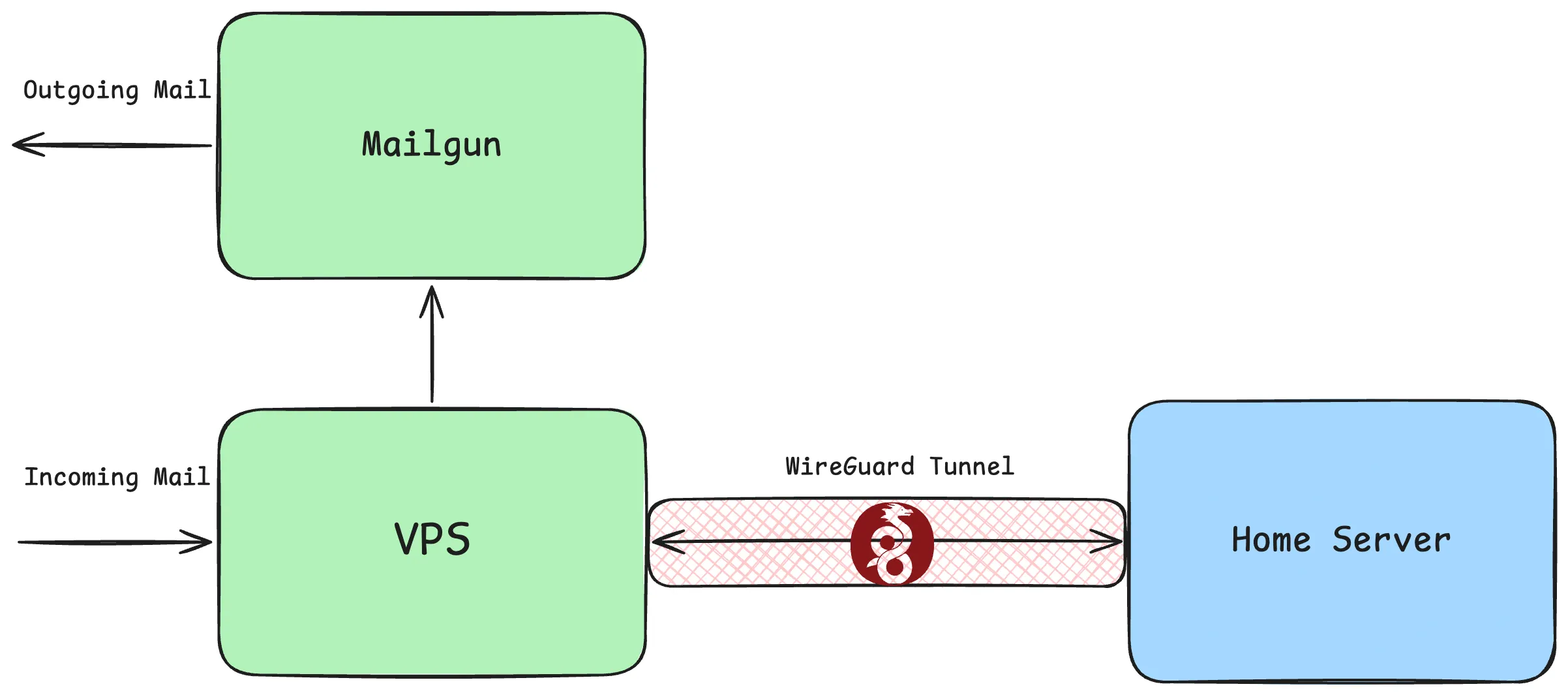
This is where a VPN comes in. They are mostly known for changing your IP address and improving your privacy while you access the internet, but what they really do is provide an encrypted tunnel between any two devices on the internet. We can make our reverse proxy send traffic through the tunnel, and our ISP has no idea about it, they just see you using a VPN! Of course, they could see traffic patterns over the encrypted tunnel and deduce that you are running a server. However, this is the same pattern as someone just leaving their computer on all the time, so realistically they won’t come hunting you down, but I’m not a lawyer here, go find someone who is to get the real deal. So great! We can set up a tunnel with WireGuard, configure the VPS to forward packets at Layer 4(TCP/UDP) with something like HAProxy, and we’re done!
Right?
Act 3: No SMTP for You
We already talked about how ISPs put you on a blacklist so any mail you send gets blocked. Well turns out all of the free VPS providers block outbound SMTP traffic completely. Nothing at all you can do about this. Try as you might to unblock outbound traffic on port 25, they’ll block you. Now luckily this is a much easier problem to solve, as there are services such as Mailgun which can send email for free on your behalf, up to a limit (100 emails/day in the case of Mailgun, which is more than enough for our use case). This limit only applies to outbound email, as inbound SMTP is not blocked.
So in the end, the flow of traffic through all the different servers looks something like this:
Act 4: Sketchy Hacks to Make Email Secure
This is not the end of the road with email, but is where we can stop doing our own thing and start following more standard guides on setting up a email server. Stuff like DMARC/DKIM/SPF and all of the million different factors that affect deliverability, which you need to deal with. However, these things are outside the scope of this blog post. A story for another time perhaps.